
Thursday, 8 November 2012
Next I followed a Maya texturing tutorial, the tutorial I followed was extremely detailed and slightly over complicated the processes but it was clear and helpful. I only wish Maya had a developed a more user friendly texturing system, as I may struggle to remember how it is all done. But I'm sure it will grow on me. Here is an image of the work I produced during this texturing tutorial.


Today I reviewed all the remaining NURB tutorials in order to complete the NURBS challenge. Before I did all these tutorials and the challenge I hated NURBs and didnt really want anything to do with them but this work has shown me they can actually be very helpful.
The first thing I did was set up the reference images and place them on their own layer so I could quickly show/hide them.

Then I began using different NURB tools and techniques that I had previously learned via all the tutorials in order to create my character. While doing this I faced a few issues, as working with NURBs is extremely different to working with polygons. Some of the tools I attempted to use that would work for polygons didn't work for NURBs. One of which was the technique I use to duplicate and then scale in order to copy and paste the arm parts on the other side. With polygons this can be done easily by combining the objects and then detaching the object once they have been placed in position. However when this is attempted with NURBs it is harder to combine them, meaning when a selection of them are rotated or scaled simultaneously they all move individuality around their center points rather than as one object. I'm sure there is a way to combine them that I still need to learn but for now I moved and rotated the objects one by one. My point is that, once you start working with NURBs its like working in a whole new application as your knowledge from polygon editing is not effectively cross compatible with NURBS. Because of this point I'm tempted to avoid using them in my final character due to the time restriction and how much new information I would be required to remember simultaneously.
Here are some images of my final character's front and side views.


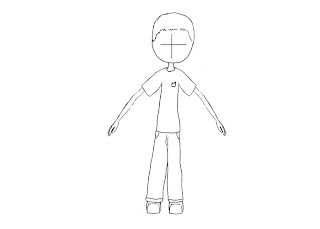

The first thing I did was set up the reference images and place them on their own layer so I could quickly show/hide them.

Then I began using different NURB tools and techniques that I had previously learned via all the tutorials in order to create my character. While doing this I faced a few issues, as working with NURBs is extremely different to working with polygons. Some of the tools I attempted to use that would work for polygons didn't work for NURBs. One of which was the technique I use to duplicate and then scale in order to copy and paste the arm parts on the other side. With polygons this can be done easily by combining the objects and then detaching the object once they have been placed in position. However when this is attempted with NURBs it is harder to combine them, meaning when a selection of them are rotated or scaled simultaneously they all move individuality around their center points rather than as one object. I'm sure there is a way to combine them that I still need to learn but for now I moved and rotated the objects one by one. My point is that, once you start working with NURBs its like working in a whole new application as your knowledge from polygon editing is not effectively cross compatible with NURBS. Because of this point I'm tempted to avoid using them in my final character due to the time restriction and how much new information I would be required to remember simultaneously.
Here are some images of my final character's front and side views.


Wednesday, 7 November 2012
NURBS 1-5
Today I experimented with Nurbs and compared them to polygons. Below is some screenshots and conclusions to my findings.

The sphere to the left is made from polygons and the sphere to the right is made from Nurbs. As you can see suing NURBS is a more efficient way of creating curves. This is because in 3D work the Polly count is highly important. This is because an object with a high poly count will have slower loading speeds than an object with a low poly count. This issue is not so bad in videos because the video is rendered before it is presented to the user or viewer, but an object with a high polygon count will require a longer render time, due to more detail and a wider range of visible angles and pixel colors.
This issue is then amplified if the object is to be animated live in a game. This is because a high polygon count can cause game play lag and again slow loading depending on the processor of the users computer. In order for a game to be successful it must be playable by as many customers as possible this means creating a game with minimal requirements. By creating models with a low poly count owners of common computers, old computers and top quality gaming computers can enjoy the product. And more customers means more profit.
As my final peace of work is going to be a rendered video rather than a live active character in a game I don't need to worry about the polygon count too much. However after this module is complete I do plan to embed the video within a flash game. This means I can still benefit from a low poly count due to lowering the file size of the video. This will help me by lowering download time for the game in which the video will be contained. Because of this is it moderately important for me to be careful with my polygon count and try to minimalism polygons when possible, meaning the use of NURBs for curves may be in my interest.

This next image demonstrates the flexibility of objects created by NURBS. As you can see again the NURB shape on the right contains a lower poly count but a higher quality curve and more unique controls. The controls available in NURBS is unique and easy to use, however they are slightly restrictive compared to polygons. The best way to describe these differences is by comparing how the systems work for the rendered outputs. For example polygons are like rasterized bitmap images, with each pixel having its own variable unique properties and colors. Where as NURB renders are more like vector graphics created by mathematical geometry. Overall this means NURB's are fast and effective for smooth curves, they have fast loading speeds, a low polygon count and may require high quality textures in order to appear realistic. Where as polygons can have higher texturing detail, can be used to creating a wide range of shapes with sharp edges, generally have more polygons and generally have a larger file size.

This image displays some of the controls and possible shapes that can be made with NURBS.

This image displays how the CV's, Isoparms and Pathes can be altered to manipulate a NURBS object.
 This image demonstrates how the surface editing tool can be used to manipulate NURB objects.
Today I experimented with Nurbs and compared them to polygons. Below is some screenshots and conclusions to my findings.

The sphere to the left is made from polygons and the sphere to the right is made from Nurbs. As you can see suing NURBS is a more efficient way of creating curves. This is because in 3D work the Polly count is highly important. This is because an object with a high poly count will have slower loading speeds than an object with a low poly count. This issue is not so bad in videos because the video is rendered before it is presented to the user or viewer, but an object with a high polygon count will require a longer render time, due to more detail and a wider range of visible angles and pixel colors.
This issue is then amplified if the object is to be animated live in a game. This is because a high polygon count can cause game play lag and again slow loading depending on the processor of the users computer. In order for a game to be successful it must be playable by as many customers as possible this means creating a game with minimal requirements. By creating models with a low poly count owners of common computers, old computers and top quality gaming computers can enjoy the product. And more customers means more profit.
As my final peace of work is going to be a rendered video rather than a live active character in a game I don't need to worry about the polygon count too much. However after this module is complete I do plan to embed the video within a flash game. This means I can still benefit from a low poly count due to lowering the file size of the video. This will help me by lowering download time for the game in which the video will be contained. Because of this is it moderately important for me to be careful with my polygon count and try to minimalism polygons when possible, meaning the use of NURBs for curves may be in my interest.

This next image demonstrates the flexibility of objects created by NURBS. As you can see again the NURB shape on the right contains a lower poly count but a higher quality curve and more unique controls. The controls available in NURBS is unique and easy to use, however they are slightly restrictive compared to polygons. The best way to describe these differences is by comparing how the systems work for the rendered outputs. For example polygons are like rasterized bitmap images, with each pixel having its own variable unique properties and colors. Where as NURB renders are more like vector graphics created by mathematical geometry. Overall this means NURB's are fast and effective for smooth curves, they have fast loading speeds, a low polygon count and may require high quality textures in order to appear realistic. Where as polygons can have higher texturing detail, can be used to creating a wide range of shapes with sharp edges, generally have more polygons and generally have a larger file size.

This image displays some of the controls and possible shapes that can be made with NURBS.

This image displays how the CV's, Isoparms and Pathes can be altered to manipulate a NURBS object.

Monday, 5 November 2012
Today I continued the production of my character. I also tested out Ncloth and how it can be used in order to create flexible and interactive materials in Maya. I followed a helpfull tutorial in order to learn how Ncloth works. I recommend this video to other students and anyone interesting in using Ncloth because I found it very helpful. I will add a link at the bottom.
I enjoyed creating Ncloth because I was expecting it to be much more complex and harder to figure out, however it was surprisingly easy and seems to work perfectly. It may become more of an issue when I begin animating my character and moving its legs around the cloth, but for now it works great. The next thing I will do is continue to model the simple parts of my character such as legs and feet. Once this is done I will consider new designs for the heads and hands in order to make it easier for me to model in maya. I plan to do this because I'm assuming the hands and head will be hard to model and very time consuming.
Ncloth tutorial: http://www.youtube.com/watch?v=N8UWFDb7tfk
My character progression: http://www.youtube.com/watch?v=biSe-PZcd_0&feature=plcp
I enjoyed creating Ncloth because I was expecting it to be much more complex and harder to figure out, however it was surprisingly easy and seems to work perfectly. It may become more of an issue when I begin animating my character and moving its legs around the cloth, but for now it works great. The next thing I will do is continue to model the simple parts of my character such as legs and feet. Once this is done I will consider new designs for the heads and hands in order to make it easier for me to model in maya. I plan to do this because I'm assuming the hands and head will be hard to model and very time consuming.
Ncloth tutorial: http://www.youtube.com/watch?v=N8UWFDb7tfk
My character progression: http://www.youtube.com/watch?v=biSe-PZcd_0&feature=plcp
Sunday, 4 November 2012
After completing all the tutorials I was keen to move on with my character so I added some additional armor to him today. Whilst doing this I used all the general tools, smooth and duplicate. Here is a link to a video of my current progress:
http://www.youtube.com/watch?v=Sk9rwj90hzc&feature=youtu.be
http://www.youtube.com/watch?v=Sk9rwj90hzc&feature=youtu.be
Friday, 2 November 2012
Today I did the tutorials from 16 - 21. I'm glad I did all these little tutorials as they have made a strong contribution my overall knowledge of the tools in Maya. these tools seem basic but they can be extremely helpful and can be hard to figure out how to do them without guidance. So I may look back on the videos of my work to refresh my knowledge of these techniques in the future. Below is a link to a video of my work.
http://www.youtube.com/watch?v=QYlntOshhQg
http://www.youtube.com/watch?v=QYlntOshhQg
I completed eleven to fifteen of the tutorials today. I found some interesting uses of the soft select tool during these tutorials, and was happy to learn some of these techniques that where new to me. Below is a link to my progress.
https://www.youtube.com/watch?v=wdoE0NJKEdM
https://www.youtube.com/watch?v=wdoE0NJKEdM
Subscribe to:
Posts (Atom)